Rules that are easier to understand
The Rules screen now shows what each rule checks and what it does, without you having to open it. Rules are also grouped by the stage they run in, so it's clear which ones act before and which act after comments are saved.
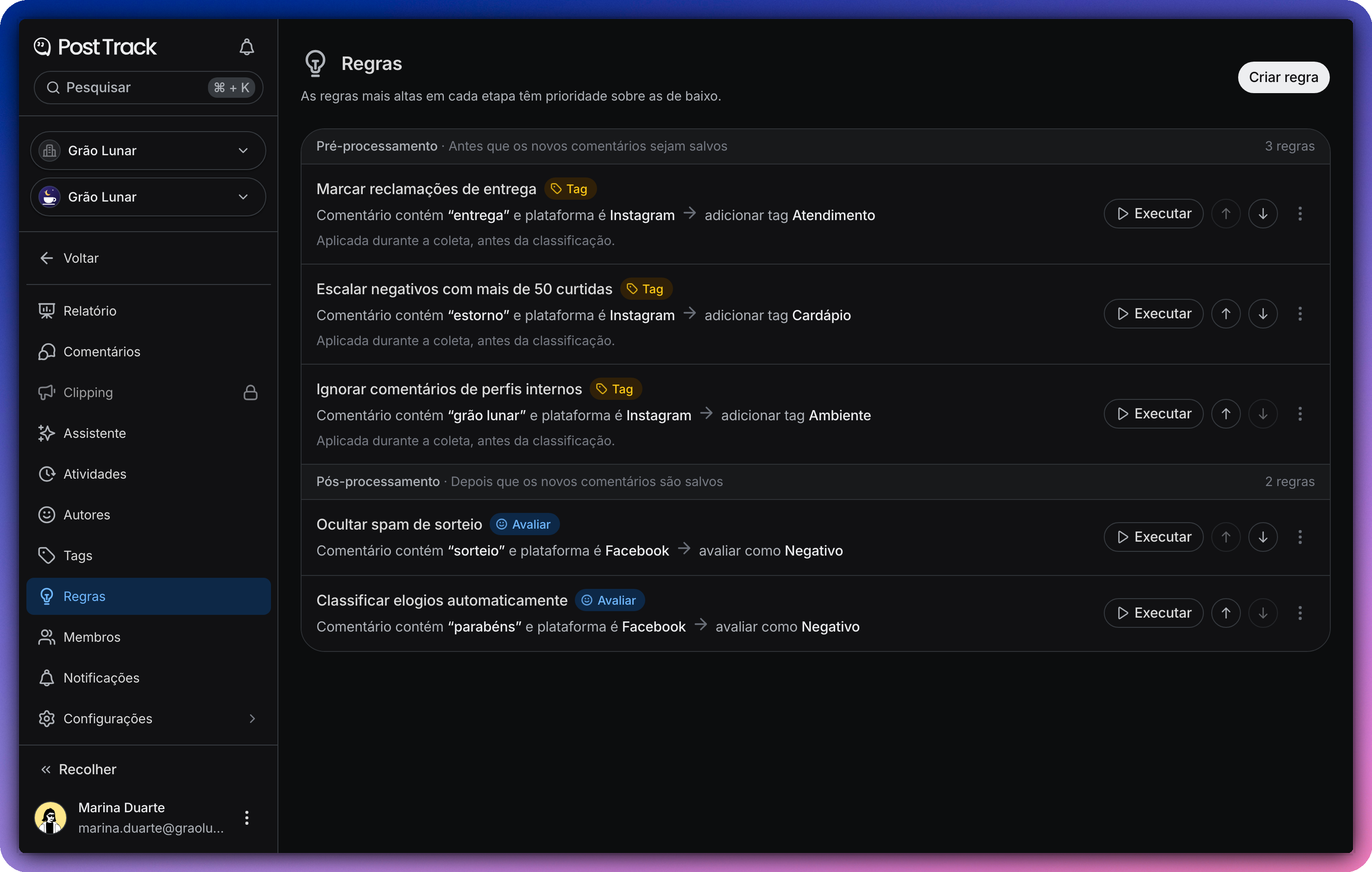
A summary of each rule
Below its name, each rule shows a line with its conditions and, after the arrow, its actions. For example, a comment that contains "delay" gets the Delivery tag. Tags, Facebook pages, Instagram accounts and groups appear by name.
Next to the name, a colored badge shows the type of each action (add a tag, rate the sentiment, do not sync, reply or notify), so you can spot a rule in the list at a glance.
Grouped by stage
Pre-process rules run before new comments are saved, and Post-process rules run right after. Each stage has its own block, with its number of rules.
The order within each stage
Within a stage, the rule at the top has the final say. If two rules rate the sentiment of the same comment, the higher one wins. Use the up and down buttons next to Execute to change the order. On some monitors, these buttons could leave a rule in the wrong spot, and that's now fixed.
On mobile
In your phone's browser, the list fits on the screen without scrolling sideways, and each rule's buttons are always within reach.